Chords Library — User Manual
What is the Chords Library?
The Mazmazika Chords Library is a huge collection of songs that have already been analyzed for you — no uploading, no waiting. Search for a song or an artist, open it, and you get an interactive play-along page that follows and highlights the chords in time with the music, complete with chord diagrams for guitar, ukulele and piano and a built-in vocal-remover mixer. It's built for learning songs, practising, performing covers and teaching.
Browsing & searching the library
Open the Chord Library from the sidebar (or Audio Tools → Chords Library). It has two tabs — Songs and Artists. On the Songs tab you can search the whole catalogue, sort it, and scroll the All Songs grid of cards (cover art, title, artist, date added and view count).

- Search — type a song title or an artist's name and press Search.
- Sort by — Most Popular, Newest First, Oldest First, or Random Order.
- Library statistics — a quick view of how big the catalogue is (thousands of songs across hundreds of artists and many languages).
- All Songs — keep scrolling and more cards load automatically; click any card to open that song.
Finding songs by artist
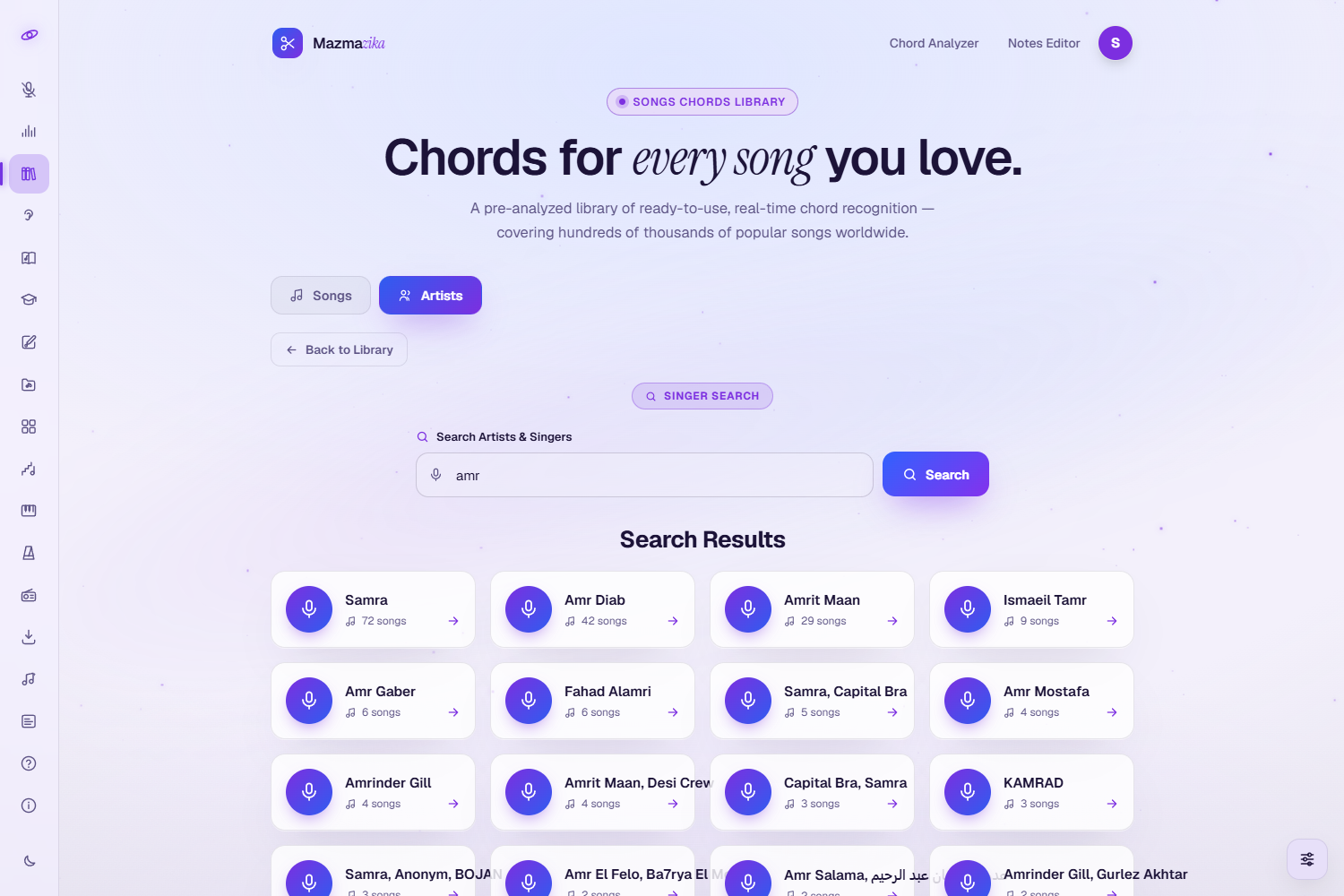
Prefer to browse by musician? Switch to the Artists tab, type an artist or singer name, and press Search. Pick an artist from the results to jump to their analyzed songs.
The interactive song page
This is the heart of the library — a synchronized, play-along chord page.
Play along
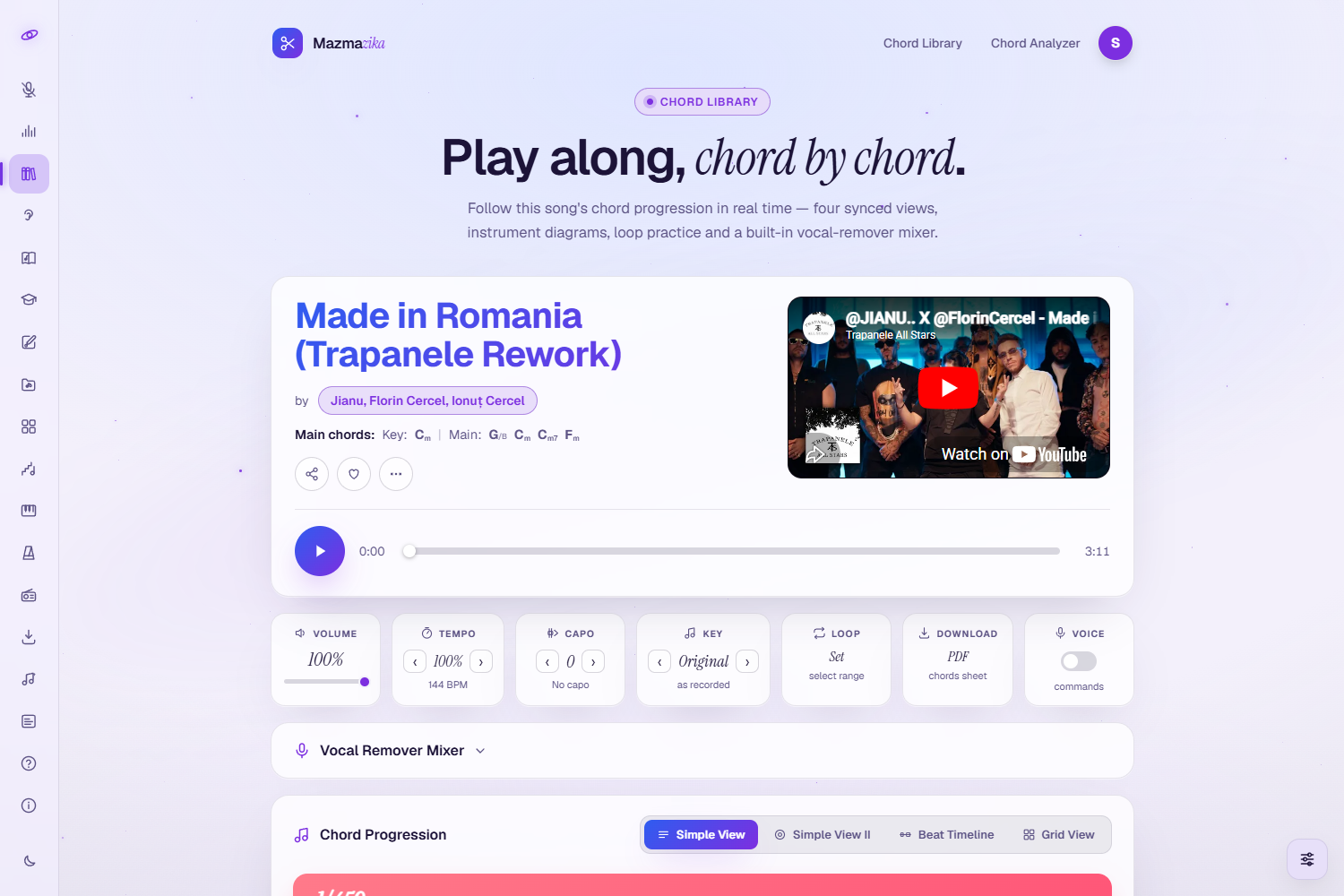
- Synced player — press play and the song's video plays while the chords follow along, highlighting the current chord in real time.
- Key & main chords — the detected key and the song's most-used chords are shown at the top.
- Chord progression — the full progression, shown four ways: Simple View, Simple View II, Beat Timeline and Grid View.
- Chord diagrams — see how to play every chord on Guitar, Ukulele or Piano, with an Overview of all shapes and an Edit tab to correct a chord.
Practice tools (toolbar)
- Volume — set the playback level.
- Tempo — slow the song down (without changing pitch) to learn a tricky passage.
- Capo — set a capo and the chord shapes update to the easier, capo-friendly versions.
- Key — transpose the whole song to a key that suits your voice or instrument.
- Loop — repeat a section while you practise.
- Download — get a clean, printable PDF chord sheet.
Vocal Remover Mixer (built in)
Right on the song page you can open the Vocal Remover Mixer to split the track into stems and practise with just the parts you want — for example, mute the original guitar and play it yourself while following the chords.
See Also
Related songs are suggested at the bottom so you can keep practising without going back to search.
Free vs. Premium
- Browsing, searching and viewing chords & diagrams are free. Guests can open a limited number of songs; logging in removes that view limit.
- Premium (subscription) unlocks the practice tools — Tempo, Key, Capo, Loop and PDF download. When premium is active the song page shows all features unlocked.
Use cases
- Practice & learning — play along with real songs on guitar, piano or any chordal instrument.
- Cover performance — learn a song's exact progression to perform it.
- Songwriting — study the harmony of songs you love for inspiration.
- Teaching — use printable sheets and synchronized playback in lessons.
Tips
- Slow it down with Tempo to ~75% when learning a new progression, then speed up.
- Use Capo to get simpler open-chord shapes for hard keys.
- Loop the chorus to drill the part you find hardest.
- Split the stems in the built-in mixer to isolate (or mute) an instrument while you play.
- Print the PDF and mark your own fingerings and rhythm notes.
Can't find your song?
If a song isn't in the library yet, analyze it yourself with the Chord Analyzer (paste a link or upload the audio) — your analysis opens on the same play-along page.
Troubleshooting
- "Upgrade to unlock…" Tempo, Key, Capo, Loop and PDF need a subscription; browsing and viewing chords stay free.
- Reached your view limit? Guests can open a limited number of songs — log in for unlimited viewing.
- No video / no sound? Click the player once (browsers only start media after you interact) and check your device volume.
- Chords look off for your instrument? Use Key to transpose or Capo to get friendlier shapes, or fix a single chord with the diagrams' Edit tab.
Related tools
Analyze your own songs with the Chord Analyzer, split a track into stems with the Vocal Remover, or keep time with the Metronome.